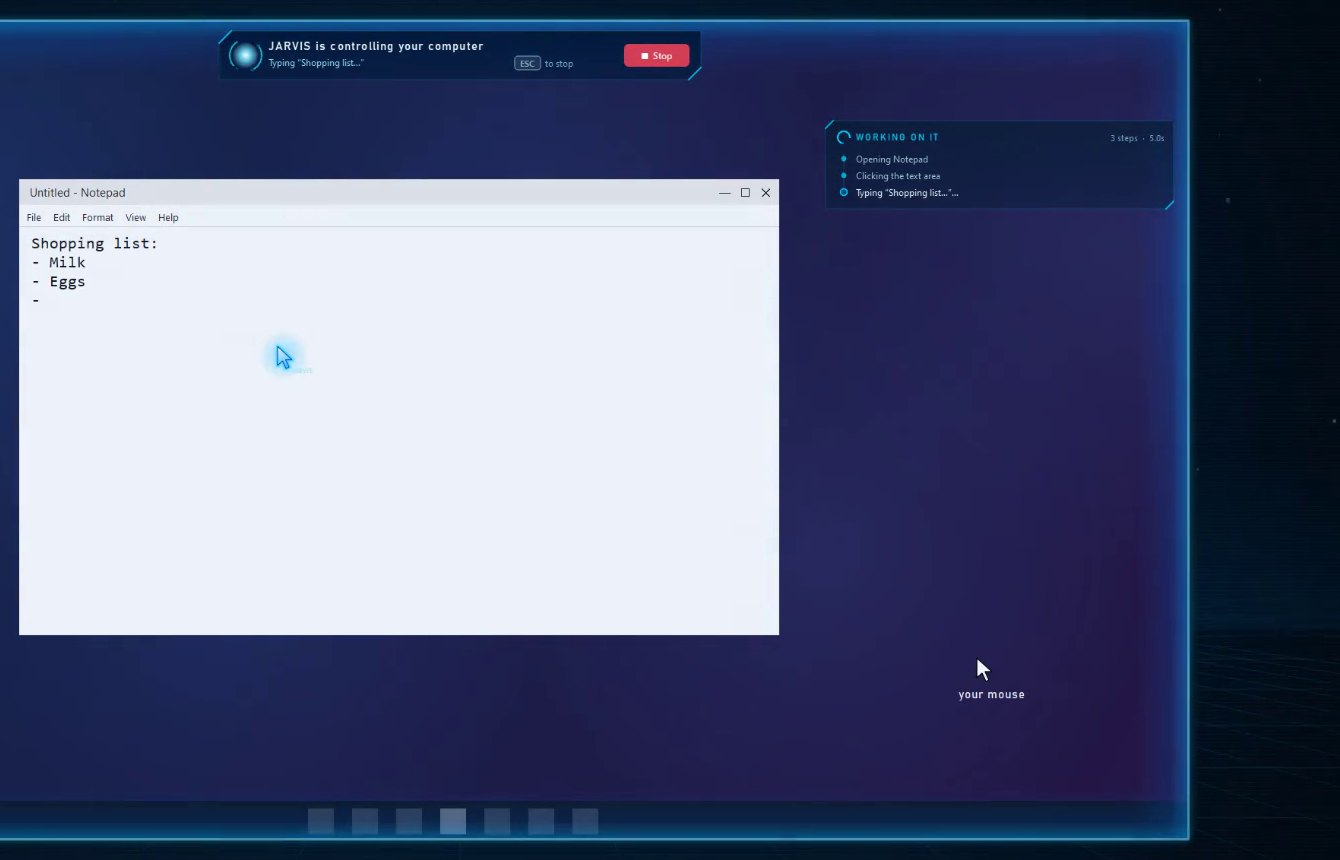
Its own cursor. Your mouse stays yours. Pro
Zyr reads the screen as text (never screenshots) and clicks real buttons with a cursor that moves like a hand.
 ZYR Assistant
Say “Hey Zyr”. It answers out loud, works your computer with its own cursor, runs a team of AI coding agents, and picks up when you call from your phone.
Basic $5/month · Pro $10/month · Windows 10 and 11
Try it: type anything to Zyr, or grab a card and drag it around.
A preview of the app: it always gives the same answer, spoken by your browser. Nothing you type is sent anywhere.
Good evening.
What can I do for you?
Standing by
Say “Hey Zyr” to wake me
System
Status
Works with the AI you already use, through your own keys
Everything in one assistant
A voice assistant for Windows that actually uses your computer, and shows you every step.
Zyr reads the screen as text (never screenshots) and clicks real buttons with a cursor that moves like a hand.
Wake it by voice or with Ctrl Alt J. It answers out loud in a natural voice.
A live task card ticks off each step. One key hands control straight back.
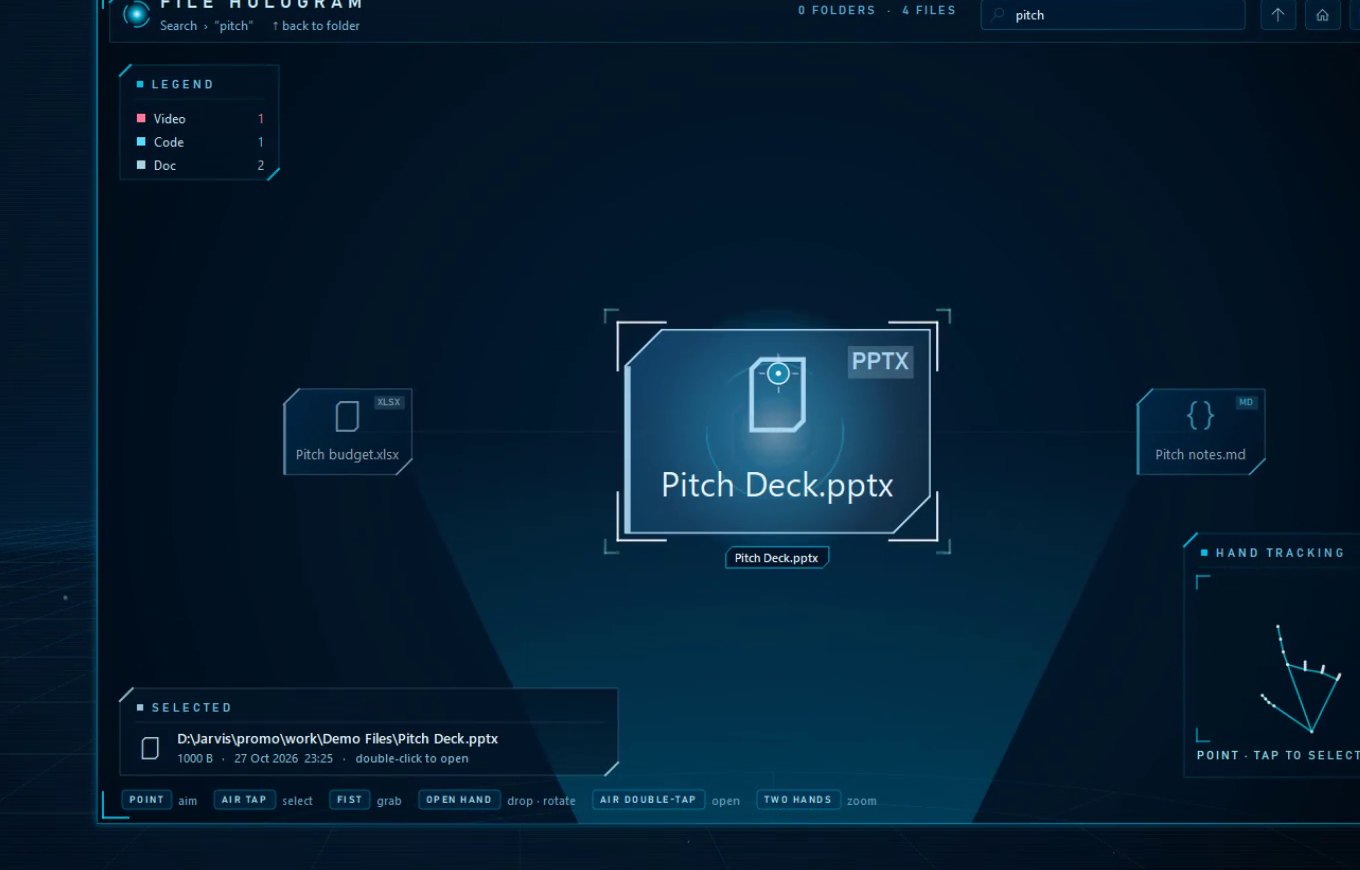
Ask for a file and your folders float as glowing cards that swing round to the match. Point and tap the air to open it.
If one AI provider is busy or out of free quota, the next takes over mid-task.
Preferences and recent conversation carry over restarts, encrypted on your PC.
Google MediaPipe on your PC, sealed in a sandbox with no internet. Off until you allow the camera.
Filmed on version 2.7.1, so the look has changed since.
Coding agents Unlimited on Pro
Say “spin up an agent to fix the login bug” and it gets to work in the background. Watch every plan, command and change, then keep it or undo it. Nothing is ever pushed.
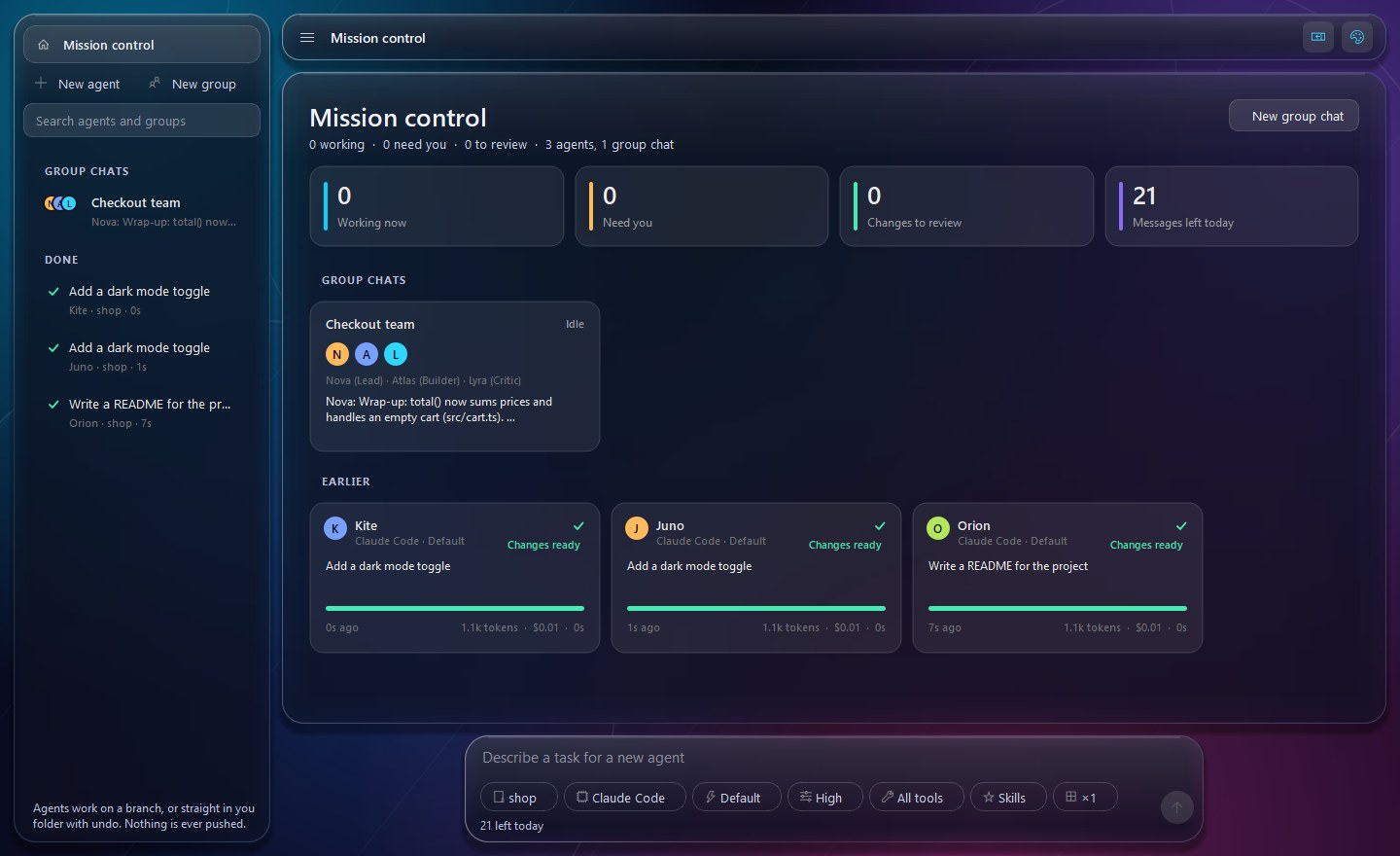
A Lead, a Builder, a Researcher and a Critic in one room, handing work to each other with @mentions.
Send one task to up to four agents at once and compare what each one did.
Agents work on their own branch, or in your folder after a snapshot. Keep the changes or put everything back.
Basic includes 25 agent messages a day. Agents use Claude Code, Codex or OpenCode with your own sign-in, or your OpenRouter or Claude API key.
Android app Pro
Tap the orb and talk. “Open Notepad and type hi” happens on your computer at home, and Zyr answers out loud.
For Android 8 or newer · included in Pro · pair it once in Settings → Pair on your PC.
Desktop buddy
It shows replies and each step in a speech bubble, cheers when an agent finishes, and falls asleep after five quiet minutes.



Pricing
Simple monthly plans in USD. You connect your own AI keys, so there are no usage fees from me.
The voice assistant
$5 / month
Zyr, fully unlocked
$10 / month
ZYR Assistant is launching soon. Checkout isn't open yet.
There is no free plan. You pay for the software and the features of your plan. AI answers come from third-party services (Google, NVIDIA, OpenRouter, Groq) that you connect with your own keys; their limits and outages apply, and unlimited AI use is not promised. Plans renew monthly until you cancel, with no cancellation fee. See Pricing, the Subscription, Cancellation and Refund Policy, the Terms and the Privacy Policy.
Private by design
You paste your own AI keys and they stay on your computer. Your voice goes only to the AI and speech services you choose. The camera works only after you allow it.
When checkout opens, choose a plan and you'll get a 6 MB setup wizard. It fetches Python and the libraries from their official sources while it installs.
Windows 10 or 11 (64-bit) · microphone · internet during install · about 640 MB installed
Basic ($5/month) is the voice assistant: it listens, answers out loud, searches, opens apps, sets timers and remembers you. Pro ($10/month) adds every feature: the ZYR Assistant phone app, unlimited coding agents and group chats (Basic has 25 agent messages a day), Zyr controlling your computer with its own cursor, the 3D file hologram, and hand tracking.
No. ZYR Assistant needs a Basic or Pro plan: the app turns on with the activation key from your dashboard.
AI agents that work on your code in the background: one at a time, several on the same task to compare, or a group chat where they talk to each other and build together. They use Claude Code, Codex or OpenCode with your own sign-in, or your OpenRouter or Claude API key. Every change can be kept or undone, and nothing is ever pushed.
No. While it controls your PC it reads a text map of the screen, built on your PC by Windows' accessibility interface: window titles and the names, values and positions of buttons and fields. No picture of your screen is taken or sent.
Not to ZYR AI. You paste your own keys from NVIDIA, OpenRouter, Groq or Gemini, which all have free tiers. Your plan covers the ZYR Assistant app itself.
No. Zyr uses its own on-screen cursor and Windows accessibility. A few actions (double-click, right-click, drag) briefly borrow the pointer and glide it back to where you left it.
Press Esc or click Stop on the banner. Zyr stops immediately and tells you so.
It isn't signed with a paid code-signing certificate yet, so SmartScreen doesn't recognise it. Choose “More info”, then “Run anyway”.
No. Hand control is off until you allow it. Google MediaPipe analyses the frames in memory on your PC, inside a Windows sandbox with no internet access; nothing is saved or uploaded.
Settings → Apps → ZYR Assistant → Uninstall. It asks whether to keep your settings and keys for a future reinstall.